
Minimal Principal Component example
I was looking for some minimal principal component example to complement the Wikipedia entry on this topic. Unfortunately, I was only able to find lengthy pages that tried to explain more than I was looking for with obfuscating calls to exotic library functions. So here is my example that generates the following figure.
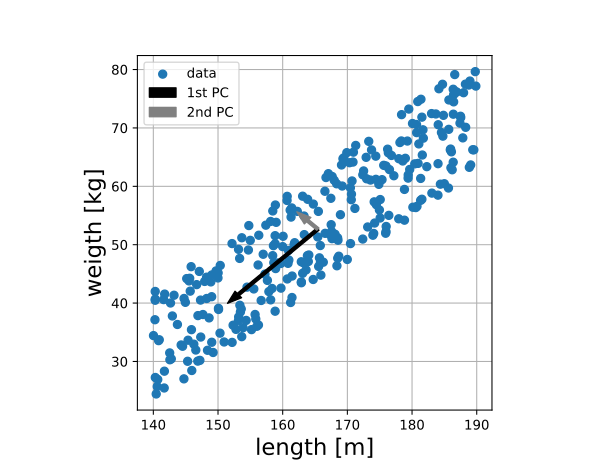
#!/usr/bin/env python3
import numpy as np
import matplotlib.pyplot as plt

# A simple function that returns normalized data and statistics
def normalize (x):
    meanx = np.mean(x)
    xzm = x - np.array([meanx]*len(x))
    stdx = np.std(xzm)
    xn = x/np.array([stdx]*len(x))
    return xn, meanx, stdx

# Generate plausible Length (m) and weight (kg) data
l = np.random.uniform(140, 190, 300)
w = 0.8*l - 90 + np.random.uniform(20, size = len(l))
ln, ml, sl = normalize (l)
wn, mw, sw = normalize (w)

# PC's are the eigen vectors for the co-variance matrix
xy = np.array([ln, wn])
C = np.cov (xy)
W, v = np.linalg.eig (C)

# Sort and scale components
if W[0] > W[1]:
    Pc1 = np.sqrt(W[0])*v[:,0]
    Pc2 = np.sqrt(W[1])*v[:,1]
else:
    Pc1 = np.sqrt(W[1])*v[:,1]
    Pc2 = np.sqrt(W[0])*v[:,0]
PC1 = [sl, sw]*Pc1
PC2 = [sl, sw]*Pc2

# Generate figure
fig, ax = plt.subplots()
ax.grid()
ax.scatter (l, w, label = 'data')
ax.arrow (ml, mw, PC1[0], PC1[1], width = 0.5,
          length_includes_head = True, color = 'k', label = '1st PC')
ax.arrow (ml, mw, PC2[0], PC2[1], width = 0.5,
          length_includes_head = True, color = 'gray', label = '2nd PC')
ax.legend ()
plt.xlabel ('length [m]', size = 17)
plt.ylabel ('weigth [kg]', size = 17)
ax.set_aspect (1.0/ax.get_data_ratio(), adjustable='box')
ax.set_axisbelow (True)
fig.savefig ("PCA.svg")
Debian, stably broken?
A few months ago I noticed a small bug in the doas program
as provided via the Debian Bullseye (current stable) repositories:
Although the documentation describes a certain feature, it is not
available. After an online search, it appeared that this is a known
issue, and the maintainer was quick to implement a patch.
Problem solved? No, apparently the idea behind Debian’s stable branch is
that fixes needed to be tested. Depending on the timing, this can take
years, until the next stable release in introduced. Meaning that one is
left with three main options:
- Migrate to the testing branch.
- Install the program via an other methods (e.g. using Flatpak, from source, etc)
- Live with it
I have chosen the former option. So far, Debian Bookworm has worked very well for me. But I do not like the daily update routine, and in retrospect, i should have gone for the last option.